<userform name>.Show
'example
frmHome.Show
<userform name>.Show
'example frmHome.Show
Format(<value>, "<formatting convention>")
'example - outputs 2
decimalNum = 2.31321
Msgbox Format(decimalNum, "0")
<listbox name>.Clear

'if clearing a userform's listbox from outside the userform
<userform name>.<listbox name>.Clear
'example
formHome.lstOutput.Clear
<userform name>.<checkbox name>.Value
'example
If formHome.chkActiveOnly.Value = True Then
    MsgBox "User has checked the box"
Else
    MsgBox "User has not checked the box"
End If
<listbox name>.AddItem <value to be added>
'example - userform called formHome exists
formHome.lstGuests.AddItem "Tristan Smith"
Call <procedure name>
'example
Call loadSheet

Sub loadSheet()
    'code here
End Sub
'wb.Name holds the name of the open workbook
Dim wb As Workbook
For Each wb In Application.Workbooks
 <code here with involving wb.Name>
Next wb
'example
Dim wb As Workbook
For Each wb In Application.Workbooks 'for each open workbook, pass the name to lookupEGA()
   MsgBox wb.Name
   lstWorkbooks.AddItem wb.Name
Next wb
<button name>.Caption = "<new text>"
'example
btnPause.Caption = "Resume"
 Me.StartUpPosition = 0
 Me.Top = Application.Top + 25
 Me.Left = Application.Left + Application.Width - Me.Width - 25
'example - place in UserForm_Activate procedure
Private Sub UserForm_Activate() 'when form opens
   Me.StartUpPosition = 0
   Me.Top = Application.Top + 25
   Me.Left = Application.Left + Application.Width - Me.Width - 25
End Sub
#'i' is an integer variable that holds the index
 For i = 0 To <list box name>.ListCount - 1
     If <list box name>.Selected(i) = True Then Exit For
 Next i
#example
 For i = 0 To lstGuestList.ListCount - 1
     If lstGuestList.Selected(i) = True Then Exit For
 Next i
Call <module name>.<sub procedure's name>
#example - project has a userform, and a module called Commands
Private Sub btnRefresh_Click() 'located in a userform
 Call Commands.output
End Sub


Sub output() 'located in Commands module
     MsgBox "This code is in a separate module"
End Sub
Sub <procedure name>()
   'code to be run
   Application.OnTime Now + TimeValue("00:00:00"), "<procedure name>"
End Sub
'example
Sub runsEveryTenSeconds()
    If formClock.Visible = False Then Exit Sub

    Call updateClock
    Application.OnTime Now + TimeValue("00:00:10"), "runsEveryTenSeconds"
End Sub
This command is covered in this linked article, set TimeValue to (“00:00:01”)
Dim Sht As Worksheet
For Each Sht In Worksheets
   Sht.Cells.Replace What:=<old value>, Replacement:=<new value>, LookAt:=xlPart, MatchCase:=False
Next
'example - replaces all instances of person's name
'Old first/last name are in A1, B2 (respectively) in Sheet "Names"
Dim Sht As Worksheet
For Each Sht In Worksheets
    Sht.Cells.Replace What:=Sheets("MasterNames").Cells(1, 1).Value, Replacement:=txtNameFirst.Value, LookAt:=xlPart, MatchCase:=False
    Sht.Cells.Replace What:=Sheets("MasterNames").Cells(1, 2).Value, Replacement:=txtNameLast.Value, LookAt:=xlPart, MatchCase:=False
Next
If <textbox name>.Value = "<value textbox should be>" Then
   <code to be run, provided correct textbox value was entered>
End If
'example
If txtName.Value = "" Then
     Msgbox ("No name was entered!")
End If
<variable to hold minimum> = WorksheetFunction.Min(<num1>, <num2>)
#example
minValue= WorksheetFunction.Min(100, Sheets("eg").Cells(1,1).value)
Private Sub <multipage name>_Change()
   If Me.<multipage name>.Value = <pg index under which code should run> Then
      <code to be run when page is activated>
   End If
End Sub
'example for multipage named "mtp"
Private Sub mtp_Change() 'called whenever active page in multipage changes
   If Me.mtp.Value = 1 Then 'if user opens the "Show Guest List" page
        Call loadGuestLists 'automatically runs this code
   End If
End Sub
<integer variable> = Len(<string>) - Len(Replace(<string>, "<substring>", ""))
'example
sentence = "Hello, this is a sentence,"
countCommas = Len(sentence) - Len(Replace(sentence, ",", ""))
msgbox(countCommas) 'output is 2
Exit Sub
#example - exits procedure if something error description happens
Private Sub btnAddNew_Click()
errorStr = errorCheck 'checks for errors ie. missing gaps in textfields

If Not (errorStr = "") Then 'if something wrong with wat user entered
     Exit Sub
End If

End Sub
<listbox name>.AddItem Sheets("<sheet name>").Cells(<row>, <column num>).Value & ...etc
#example - reads a list of food entries from a sheet
Private Sub loadListbox()
     lstFoods.Clear
     lastEntryRow = Sheets("Foods").Cells(Sheets("Foods").Rows.Count, "A").End(xlUp).Row 'how many foods are there?

     For i = 2 To lastEntryRow 'adds each food entry row into the listbox
        lineDisplay = Sheets("Foods").Cells(i, 1).Value & Chr(9) & Sheets("Foods").Cells(i, 2).Value
        lstFoods.AddItem lineDisplay
     Next
End Sub
ActiveWorkbook.Close SaveChanges:=<true/false>
#true if want to save changes before closing
#false if disregard changes before closing
#example
Private Sub btnExit_Click()
   ActiveWorkbook.Close SaveChanges:=True
End Sub
<variable to hold maximum> = WorksheetFunction.Max(<num1>, <num2>)
#example
maxValue= WorksheetFunction.Max(100, Sheets("eg").Cells(1,1).value)
Sheets("<sheet name>").ShowAllData
'examples
Sheets("RevenueSummary").ShowAllData
ActiveSheet.ShowAllData
For another version of clear filter that does remove the filter drop-down icons, click here.
Sheets("<sheet name>").Range("<chart cell>").AutoFilter
'where chart cell is the right-most, top-most cell containing filtered data
'clears the filter dropdown icons as well
'example
Sheets("RevenueSummary").Range("A1").AutoFilter
For another version of clear filter that doesn’t remove the filter drop-down icons, click here.
Worksheets(Worksheets.Count)
'example
Worksheets(Worksheets.Count).Range("A1:A4") = "hello"
Worksheets(Worksheets.Count).Range("D1") = "world"
Worksheets(Worksheets.Count).Cells(2, 4).Value = "goodbye"
Sht.Cells.Replace What:=<old value>, Replacement:=<new value>, LookAt:=xlPart, MatchCase:=False
'example - replaces all instances of person's name
'Old first/last name are in A1, B2 (respectively) in Sheet "Names"
Dim Sht As Worksheet
For Each Sht In Worksheets
    Sht.Cells.Replace What:=Sheets("MasterNames").Cells(1, 1).Value, Replacement:=txtNameFirst.Value, LookAt:=xlPart, MatchCase:=False
    Sht.Cells.Replace What:=Sheets("MasterNames").Cells(1, 2).Value, Replacement:=txtNameLast.Value, LookAt:=xlPart, MatchCase:=False
Next
ChDir (<directory path>)
'examples - changes current directory to Desktop folder
ChDir "C:\UserA\Desktop"
lastEntryRow = Sheets("<sheet name>").Cells(Sheets("<sheet name>").Rows.Count, "<column letter>").End(xlUp).Row
For i = 2 To lastEntryRow 'adds each row to listbox
       lineDisplay = Sheets("<sheet name>").Cells(i, <column you want to show in listbox>).Value & ...etc
       <listbox name>.AddItem lineDisplay
Next
#example - reads a list of food entries from a sheet
Private Sub loadListbox()
     lstFoods.Clear
     lastEntryRow = Sheets("Foods").Cells(Sheets("Foods").Rows.Count, "A").End(xlUp).Row 'how many foods are there?

     For i = 2 To lastEntryRow 'adds each food entry row into the listbox
        lineDisplay = Sheets("Foods").Cells(i, 1).Value & Chr(9) & Sheets("Foods").Cells(i, 2).Value
        lstFoods.AddItem lineDisplay
     Next
End Sub
Workbooks("<workbook name>").Close saveChanges:=<true or false>
'example
Workbooks("example.xlsm").Close saveChanges:=true
When working with workbooks, you may get Run-Time Error:9. That is, the following message box may pop up during execution:

Tips for debugging this error:
'to retrieve data
Workbooks("<workbook file name>").Worksheets("<sheet name>").Range("<your range>").Value
Workbooks("<workbook file name>").Worksheets("<sheet name>").Cells(<row number>, <column number>).Value

'to set data
Workbooks("<workbook file name>").Workbooks("Worksheets("<sheet name>").Range("<your range>") = <your value/data>
Workbooks("<workbook file name>").Worksheets("<sheet name>").Cells(<row number>, <column number>).Value = <your value/data>
'examples
Workbooks("example.xlsm").Worksheets("Example").Range("A1:A4") = "hello"
Workbooks("book3.xlsx").Worksheets("Example").Range("D1") = "world"
Workbooks("book3.xlsx").Worksheets("Example").Cells(2, 4).Value = "goodbye"
'Method 1 - looping using a For Each loop
Dim sht As Worksheet
For Each sht In ThisWorkbook.Worksheets
    <your code here>
Next sht

'Method 2 - looping using a For loop
For i=1 To ThisWorkbook.Worksheets.Count
     <your code here, referencing Worksheets(i)>
Next
'example using both methods
Dim sht As Worksheet
For Each sht In ThisWorkbook.Worksheets
     sht.Range("B2") = "Hello"
Next sht

For i=1 To ThisWorkbook.Worksheets.Count
     Worksheets(i).Range("B2") = "Hello"
Next
Dim <object name> As Worksheet
Set <object name> = Worksheets("<sheet name>")
'example of simplification with the worksheet object

'Original code
Worksheets("exampleSheet").Range("A1") = 6
Worksheets("exampleSheet").Range("B2:B9").Font.Italic = True
Worksheets("exampleSheet").Range("B2:B9").Interior.Color = rgbRed

'Simplified code
Dim sht As Worksheet
Set sht = Worksheets("exampleSheet")

sht.Range("A1") = 6
sht.Range("B2:B9").Font.Italic = True
sht.Range("B2:B9").Interior.Color = rgbRed
ActiveSheet
'example
ActiveSheet.Range("A1:A4") = "hello"
ActiveSheet.Range("D1") = "world"
ActiveSheet.Cells(2, 4).Value = "goodbye"
Worksheets(1)
'example
Worksheets(1).Range("A1:A4") = "hello"
Worksheets(1).Range("D1") = "world"
Worksheets(1).Cells(2, 4).Value = "goodbye"
When working with worksheets, you may get Run-Time Error:9. That is, the following message box may pop up during execution:
Tips for debugging this error:
'to retrieve data
Worksheets("<sheet name>").Range("<your range>").Value
Worksheets("<sheet name>").Cells(<row number>, <column number>).Value

'to set data
Worksheets("<sheet name>").Range("<your range>") = <your value/data>
Worksheets("<sheet name>").Cells(<row number>, <column number>).Value = <your value/data>
'examples
Worksheets("Example").Range("A1:A4") = "hello"
Worksheets("Example").Range("D1") = "world"
Worksheets("Example").Cells(2, 4).Value = "goodbye"

Range("<your range here>").Find(What, After, LookIn, LookAt, SearchOrder, SearchDirection, MatchCase, MatchByte, SearchFormat)
'What - data to search for; only mandatory parameter
'value (ex) any VBA data type like 123, 12.3, "name"

'After - a single cell to start searching from
'value (ex) Range("A1"), Range("B5")

'LookIn - to search in formulas, values, or comments
'value (ex) xlValues, xlFormulas, xlComments

'LookAt - look at part of cell or entire cell?
'value (ex) xlWhole, xlPart

'SearchOrder - search by rows or columns
'value (ex) xlByRows, xlByColumns

'SearchDirection - search next cell or previous ones
'value (ex) xlNext, xlPrevious

'the following parameter's values are either true or false
'MatchCase - is search case sensitive?
'MatchByte - only relevant if you have installed double-byte language support
'SearchFormat - search by formatting (which is set using Application.FindFormat)
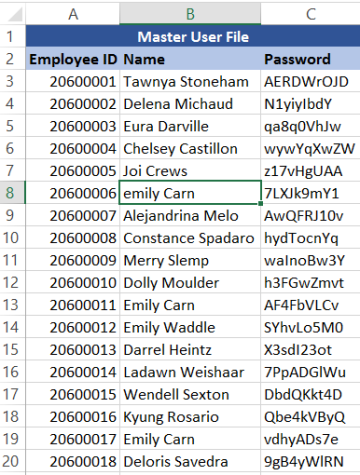
It is critical to note that the Range.Find method does not return a value, rather, it returns a Range object. If nothing is found, the Range object will be Nothing.
'examples

'returns Emily Carn
Range("B3:B20").Find(What:="Emily").Value

'selects cell B8
Range("B3:B20").Find(What:="Emily", MatchCase:=False).Select

'returns 19
Range("B3:B20").Find(What:="Emily", After:=Range("B17")).Row
'place code in a sheet under Microsoft Excel Objects
Private Sub Worksheet_Change(ByVal Target As Range)
     If target.Row = Range("<range of cell>").Row And target.Column = Range("<range of cells>").Column Then
        <code to be run here>
     End If
End Sub
'example
Private Sub Worksheet_Change(ByVal Target As Range)
     If target.Row = Range("A1").Row And target.Column = Range("A1").Column Then
        MsgBox("The value of A1 has changed")
     End If
End Sub
MkDir ("<filepath here>")
'example
'creates a folder called "newfolder" in the current Documents folder
MkDir ("C:\Users\Portia\Documents\newfolder")
To determine the filepath of a folder, click here.
Dim cntrl as Control
For Each cntrl In <userformname>.Controls 'goes through all controls in form
   If TypeOf cntrl Is Image Then 'if control is image
      cntrl.Picture = LoadPicture(<picture's filepath here>)
   End If
Next 'moves onto next control
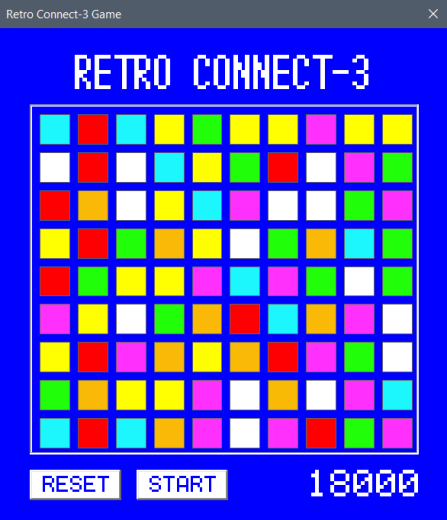
'example - updates the tiles (which are images) in a connect-3 game
'there are 90 image controls, all with naming convention: r<row>c<column>
'(ex) r01c01, r01c02, r01c03...r09c10
'there are 7 random colours a tile can be, the random number is stored in a sheet

Private Sub updateDisplay() 'call this procedure whenver display wanted to update
Dim cntrl As Control
Dim rr, cc As Integer 'for rows and columns
Dim strPath(7) As String

strPath(0) = "C:\Users\Documents\connect3\images\Yellow.jpg"
strPath(1) = "C:\Users\Documents\connect3\images\Green.jpg"
strPath(2) = "C:\Users\Documents\connect3\images\Pink.jpg"
strPath(3) = "C:\Users\Documents\connect3\images\White.jpg"
strPath(4) = "C:\Users\Documents\connect3\images\Red.jpg"
strPath(5) = "C:\Users\Documents\connect3\images\Cyan.jpg"
strPath(6) = "C:\Users\Documents\connect3\images\Orange.jpg"

For Each cntrl In frmConnect.Controls
   If TypeOf cntrl Is Image Then
      'cntrl.Name is in form r01c01, r01c02...r09c10
      rr = Int(Mid(cntrl.Name, 2, 2)) 'returns 3 if r03c04
      cc = Int(Mid(cntrl.Name, 5, 2)) 'returns 4 if r03c04
      cntrl.Picture = LoadPicture(strPath(Cells(rr, cc).Value))
      rr = rr + 1
      cc = cc + 1
   End If
Next
End Sub
Function <function name> (<parameter name> As <data type>)
     'parameters are optional
     <function name> = <your code/calculations here>
End Function
'examples
Function TotalPay (hrs As Integer)
     TotalPay = hrs*12
End Function

Public Function returnOne() As Integer
     returnOne = 1
End Function
<variable holding integer> = Int(<value that needs to be cast>)
'examples
MsgBox(Int("001")) 'produces 1
MsgBox(Int(12.1)) 'produces 12
<variable holding number> = (<max> - <min> + 1) * Rnd + <min>
'where max is the highest value the random number can be
'where min is the lowest value the random number can be
'cast to Int if a non-decimal random is desired
'examples

Dim myNumber As Integer
myNumber = Int ((20 - 10 + 1) * Rnd + 10)
'examples of values generated: 12, 10, 20, 23

Dim myNumber As Double
myNumber = (20 - 10 + 1) * Rnd + 10
'examples of values generated: 12.2, 10.2, 10, 20, 19.3, 12.2
<image control name>.Picture = LoadPicture(<file path in string form>)
'examples
profileImg.Picture = LoadPicture("C:\Users\john\Documents\johnsface.jpg")

strPath = "C:\Users\bob\Pictures\Landscapes\picoftrees.jpg"
image1.Picture = LoadPicture(strPath)
Helpful Tips


Const <constant's name> = <constant's value>
'examples
Public Const wagePerHour = 11.85
Private Const maxGuestCapacity = 2000
Const daysInYear = 365
XML Validation is the process of making sure that XML documents/schemas comply by the rules of the language. This process is similar to compiling of a VBA program. Any good XML editor will display error messages whenever XML language rules are not followed.
Although programs like Notepad can be used to create XML documents, these editors do not have validation features available.

